I typed “best woocommerce product addons plugin” into Google the other day, and I did not expect what came back.
Right at the top, the AI Overview said the top WooCommerce product add-ons plugin for most online stores is WowAddons. It described it as an all-in-one builder with 25+ field types, conditional logic, formula-based calculations and built-in analytics. And in the sources on the right, two of the articles I wrote were sitting there as the answer source.
That is a nice moment for any content writer. It is an even better one when the plugin being recommended is your own.
In this case study, I will break down what those two articles have in common, why I think Google picked them up, and what you can copy for your own product content.
Key Takeaways
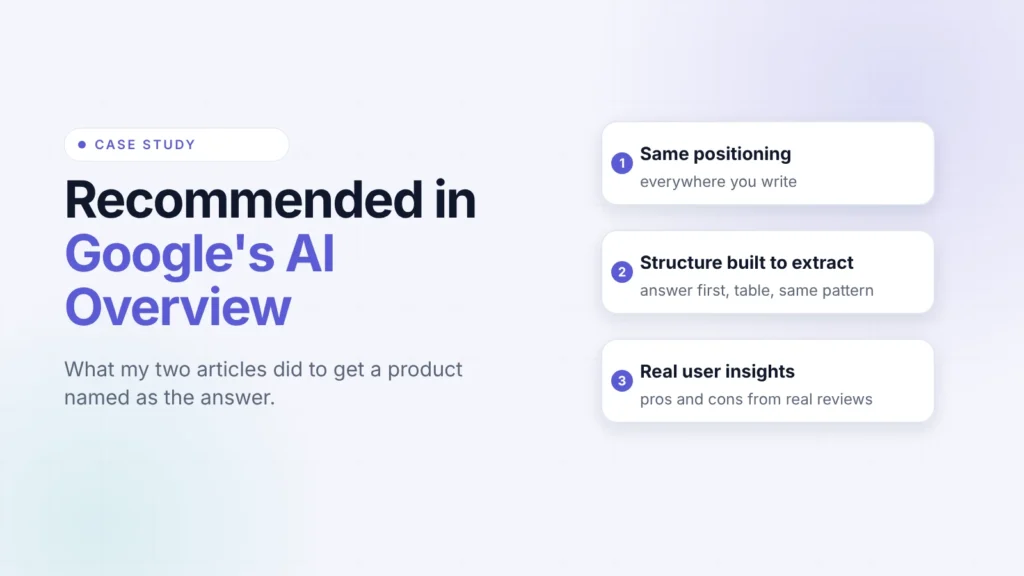
- Keep your positioning the same everywhere: we kept calling WowAddons the best all-in-one product addons plugin, and AI started describing it the same way.
- Structure is a ranking factor for AI: clear answers, descriptive headings and tables make your content easy to pull from.
- Write plainly and use numbers: short sentences and specific facts are easier for AI to quote than vague praise.
- Real user opinions make content unique: I built the “What Users Like” and “What Can Be Improved” parts from real WordPress.org reviews, and you can dig up the same insights on Trustpilot, Reddit and with ChatGPT’s deep research.
What Actually Happened
The two articles are the WowRevenue post, 7+ Best WooCommerce Product Addons Plugins in 2026, and the WowOptin post, Reviewing the Best Product Addon Plugins for WooCommerce. The first one was originally published in July and refreshed on October 22. The second one went live on October 27.
Within a few weeks, both showed up as sources in Google’s AI Overview for the search “best woocommerce product addons plugin”, and the overview recommended WowAddons first.
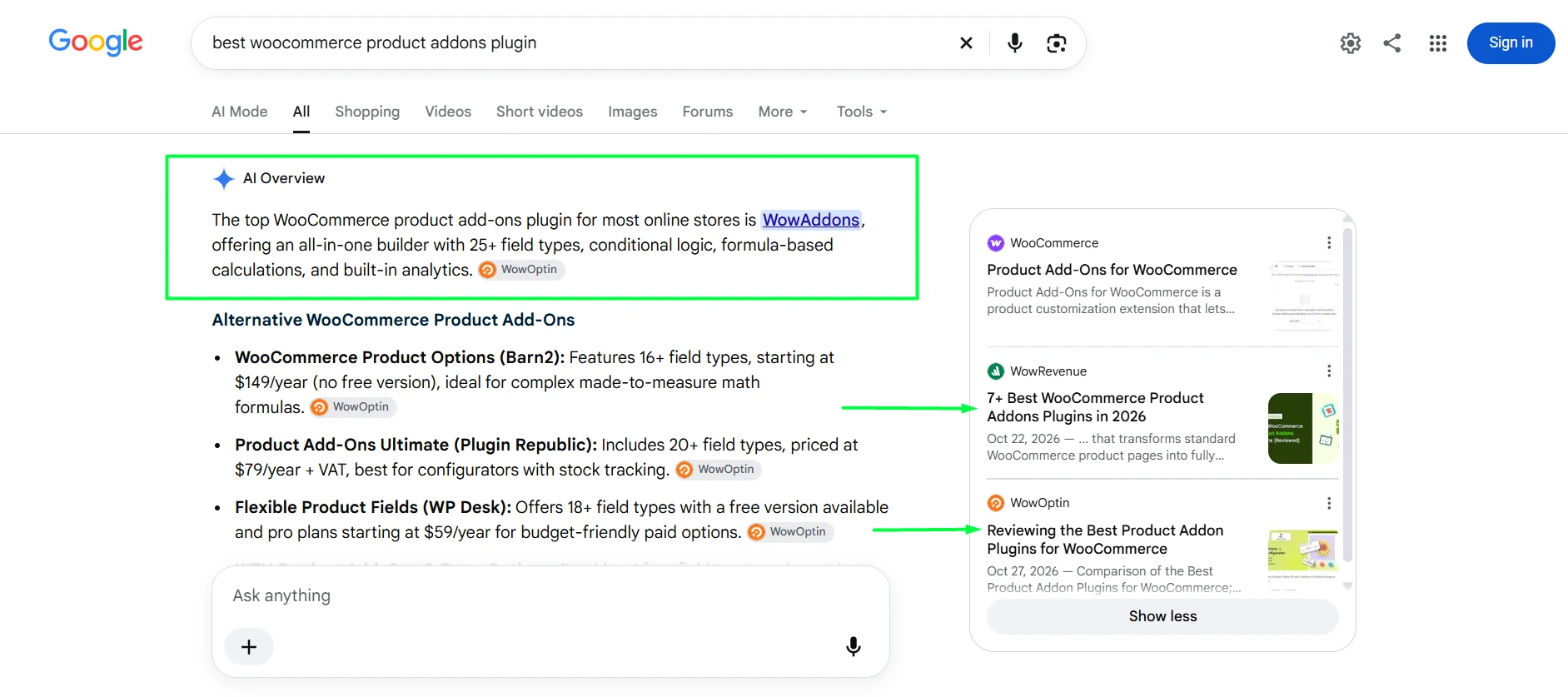
The overview then listed alternatives such as Barn2, Plugin Republic and WP Desk, each with a price, a field count and a short “best for” line. If you look at my WowOptin article, that is almost exactly the layout of the quick answer at the top. The AI did not have to work hard. I had already written the answer in a shape it could use.
Lesson 1: Keep Your Product Positioning the Same Everywhere
This is the biggest one, so I will start here.
We write a lot of articles about our product WowAddons, and from the start we had one core positioning for it: the best all-in-one product addons plugin.
Then we repeated that message everywhere we could. In listicles, in comparison posts, in reviews, across different sites. Same words, same idea, every time.
Here is why that matters. AI does not just read one page and make a decision. It sees what the web says about a product. If one article calls your plugin a form builder, another calls it a pricing tool and a third calls it a simple add-on, there is nothing consistent for the AI to repeat.
But when the same position shows up again and again, the AI has an easy summary to give. That is what happened with WowAddons. AI started to pick it up and positioned us the same way we had been describing ourselves.
If you write about your own product, decide on one sentence that defines it. Then use it consistently, in every article you can.
Lesson 2: Structure for Easy Extraction
The second thing I noticed is how much structure helped. Both articles are built so that an AI can find an answer in seconds.
- A quick answer at the top: the WowOptin article opens with a short block before the table of contents. It has five sentences, and each one names a plugin with one use case, starting with WowAddons as the best overall pick. Even if you only read that block, you walk away with the full answer.
- Descriptive headings: headings say exactly what the section answers, like “Which Product Addon Plugin Should You Choose?” or “What Can You Do With a Product Addons Plugin?”. Many are phrased the way people search, and each section covers one topic, so the AI can lift a section by its heading.
- A comparison table: one table with seven plugins and five columns, which are plugin, field types, free version, starting price and who it is best for. The cells are short phrases and numbers like “25+” or “Yes”, not full sentences. It gives readers a fast overview, and it holds the same kind of details the AI Overview repeated.
- The same pattern for every plugin: each plugin gets a bold “Best for” line, a short description, a “What Users Like” list, a “What Can Be Improved” list and a pricing line. Because every plugin follows the same order, readers can compare any two in seconds, and an AI can find the same fact in the same place every time.
- Direct FAQ answers: each answer starts with the answer itself, like “Yes” or “It can”, and then adds two to four sentences of explanation. The questions are written the way a store owner would ask them, so they match real searches.
- Clear definitions: I wrote short sentences that make sense on their own, like what a product addons plugin lets customers do before they add a product to the cart, and what conditional logic does. They are easy to quote because they do not depend on the text around them.
None of this is fancy. It is just writing for two readers at once. A person who wants a fast answer and an AI that is looking for one.
Lesson 3: Write Plainly and Use Numbers
The writing style is simple on purpose.
- Short sentences: most of them run around 10 to 20 words.
- Fragment bullets: the “What Users Like” bullets are short, usually 5 to 12 words each.
- Concrete numbers: field counts, prices per plan, ratings and refund windows. A number is easier to quote than “great value”.
- You-focused advice: I explain things the way I would to a store owner.
- Light hedging: phrases like “at the time of writing” tell readers when the information was checked.
The scenario at the start of the WowOptin article does a similar job. It is a short candle-shop example showing why normal product variations are not enough, which leads naturally into why you need a product addons plugin.
Lesson 4: Real User Insights Make the Content Unique
This is the part I am happiest about.
In both articles, I did not just list features copied from product pages. I went through real reviews on WordPress.org for each plugin we covered, and I read what users actually said about them.
That gave me two sections for every plugin:
- What Users Like: the things people consistently praise.
- What Can Be Improved: the complaints and gaps users point out.
Both are based on real opinions, so nothing is made up.
This matters because most comparison articles say the same things. They copy the same features from the same pages. Real user feedback is something those articles do not have, and it gives your content a unique angle that AI cannot get from anywhere else.
How to Check What Users Really Think
You do not need anything fancy for this. You just need to know where real users talk, and read both ends of the scale.
- Read the 5 star and the 1 star reviews: five stars show you what people genuinely love about a product. One star reviews show you where it actually falls short. Between the two, your pros and cons are almost ready to write.
- WordPress.org: for plugins, open the reviews page of each plugin and filter by star rating. The support forum is worth a look too, because it shows the problems people run into after installing.
- Trustpilot: useful for paid products and the companies behind them. The one star reviews often point to things like support, billing or refunds, which you will not find in a feature list.
- Reddit threads: search the product name along with words like “review” or “vs” in subreddits where your audience hangs out, such as r/WordPress or r/woocommerce. People tend to be blunt and detailed here.
- ChatGPT’s deep research: the quickest way to cover all of this. Ask it to read the reviews and threads for each product on WordPress.org, Trustpilot and Reddit, and to summarize what users praise and what they complain about. It saves a lot of reading. Then open the sources behind the points you plan to use and check them yourself.
Once you have the reviews, look for points that come up again and again. A complaint from one person is an opinion. The same complaint from five people belongs in your article.
It is also fair to the competitors. Every plugin gets credit for what it does well, and honest notes about what it lacks. Readers can tell when a list is balanced.
How to Copy This for Your Own Content
Here is the simple version you can follow.
- Write down your positioning in one sentence. Use it in every article about your product.
- Start with the answer. Put a short quick answer block at the top, before the table of contents.
- Add a comparison table with the details readers care about most.
- Use one pattern for every item. Best for, description, pros, cons, pricing.
- Pull from real user reviews. Check WordPress.org, Trustpilot and Reddit, read both the 5 star and 1 star reviews, and turn the points that repeat into pros and cons.
- Answer FAQs directly. Start with the answer, then explain in two to four sentences.
- Keep it fresh. Update your article and the date when prices or features change.
A Few Things to Keep in Mind
AI Overviews change. What I saw today may look different tomorrow, and nobody can guarantee a spot there.
I also cannot say for sure why Google picked these two articles. What I can say is what they share: the same positioning, a clear structure, real user insights and plain writing. That is what I would repeat.
And write for the reader first. If the article helps someone choose the right plugin, you are already doing the main job.
Frequently Asked Questions
Can I Get My Product Recommended in AI Overviews?
There is no guaranteed way, but you can make it much more likely. Keep your positioning consistent, answer the question near the top of the article, and structure the page so the facts are easy to find.
Does Structure Really Matter That Much for AI?
It does. Clear headings, tables and direct answers make it easier for an AI to find and reuse your information. A good article with a messy structure is harder to quote.
Do I Need to Write About My Competitors Too?
Yes, if you are writing a comparison. Covering competitors fairly with real feature lists and real user feedback makes the article more trustworthy for readers and for AI.
Where Do I Find Real User Reviews?
For WordPress plugins, start with WordPress.org and read the 5 star and 1 star reviews for each plugin. For paid products, Trustpilot and Reddit threads add more honest opinions. You can also use ChatGPT’s deep research to collect and summarize them quickly, then check the sources yourself.
Summing Up
Getting recommended in an AI Overview comes down to a few simple habits. Say the same thing about your product everywhere, write content that is easy to pull answers from, and back it up with what real users say.
Pick one article you already have and check it against the steps above. If you try it, I would love to hear how it goes in the comments.