Nobody ships a product and walks away. So why do we do it with blog posts?
I used to treat publishing as the finish line (well, to be honest, I still do, sometimes).
Hit publish, share it, move on to the next keyword. Repeat until the content calendar runs out.
Then, a few months ago, we did a stretch at WPXPO – going back through old posts instead of writing new ones. It changed how I work, and I want to walk you through why.
The post you forgot about is probably your best salesperson
Here’s the thing most content calendars ignore. HubSpot looked at its own blog and found that 76% of monthly views and 92% of monthly leads came from posts published before that month. (HubSpot’s historical optimization analysis)
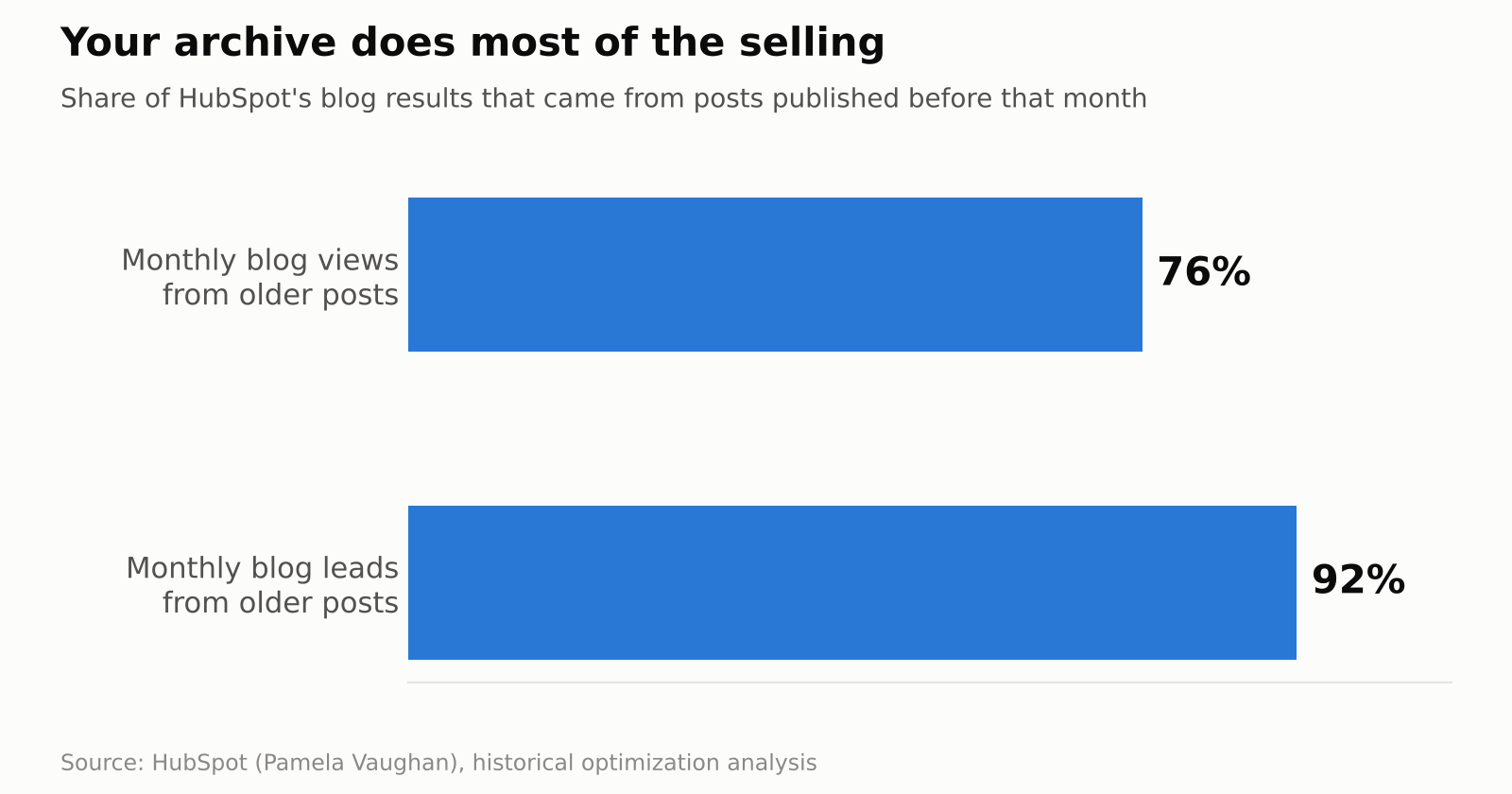
So the archive does most of the work, and most of us spend nearly all our time on the new stuff. That’s like a software team that only ever builds new apps and never fixes a bug in the old ones.
Think about what that means for your week. If three quarters of your traffic comes from posts you’ve already published, then one hour spent improving a post that already ranks can be worth more than one hour spent starting from zero.
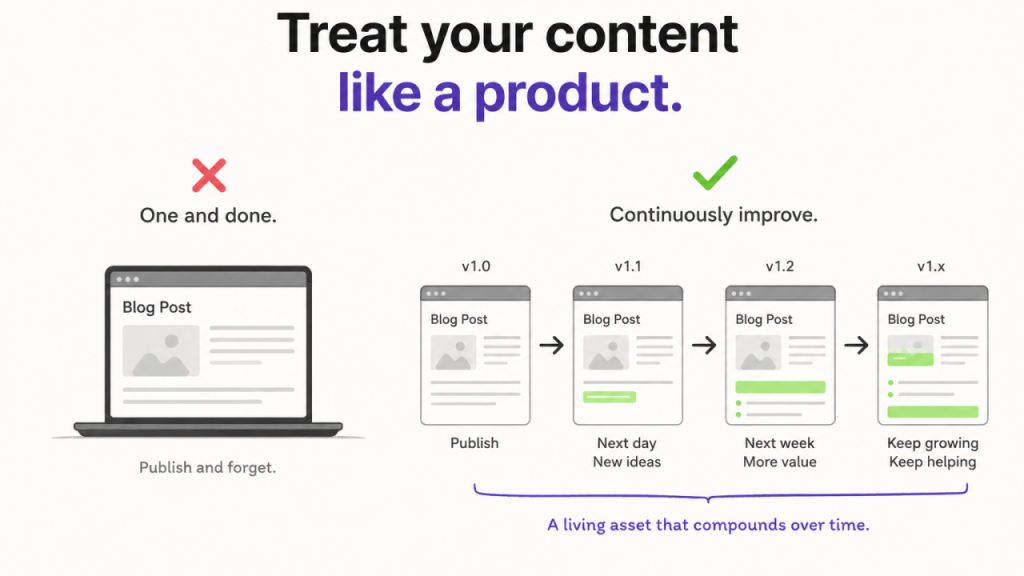
Okay, so what does “shipping v1.1” look like?
A software team doesn’t rebuild (often) the product when users complain. They patch it, improve it, and re-release it. I started doing the same with blog posts, and here’s what happened.
One of my blogs written on the topic “Best product bundles plugin” was sitting on page 3 of Google. After an update, it now ranks consistently on the 1st page (ranking between 4th and 5th positions).
Next, the “Best lifetime deals” post. We refreshed it, and it moved from 8th to 4th.
Then the niche WooCommerce blog post on “How to flip product image on hover”. It stopped ranking at all. After the update, it landed on page one at 6th.
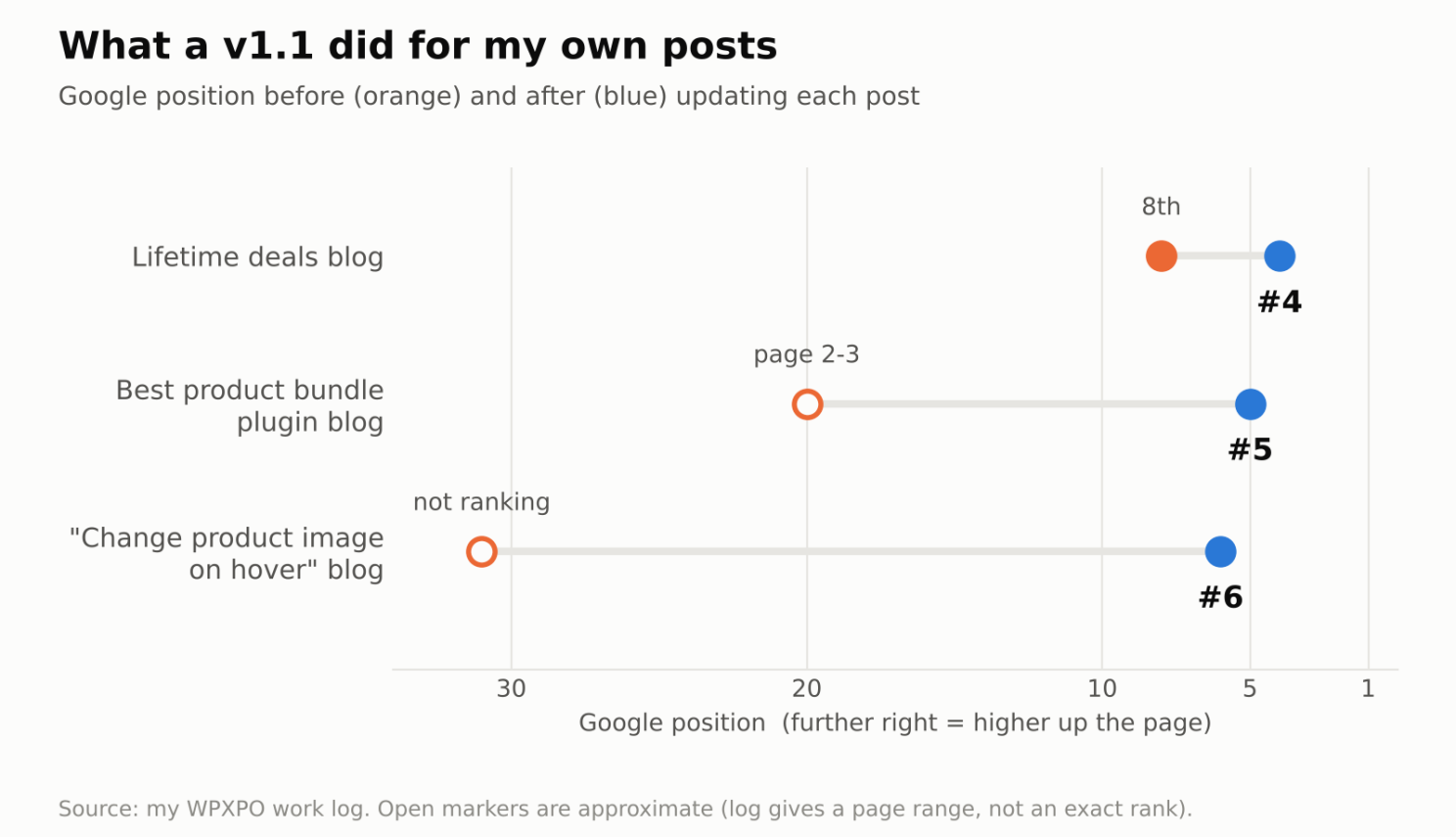
None of these were new posts. Same URLs, same topics. They just got better answers, cleaner structure, and fresher details.
The unglamorous maintenance nobody posts about
Not every v1.1 is a rewrite. A lot of it is boring product hygiene, and it’s the part that never gets a screenshot on LinkedIn.
I updated links across 174 blog posts and fixed the 404s hiding in them. Nobody celebrates that. Think of a broken link as a bug. It sends a reader to a dead end, wastes the link equity you worked for, and tells Google the page isn’t being looked after.
So, consider it a bug-fix release. A post that still recommends an old feature that doesn’t exist is a bug too. You only find these by actually going back and looking.
How I decide what to update (and what to kill)
Updating everything isn’t a strategy; it’s a long weekend you’ll never get back.
So I went through 100+ articles and sorted each one into a bucket:
- Update it. It has a keyword worth winning, and the post is close. This is where the three wins above came from.
- Merge it. Two posts fight for the same keyword, so I fold the weaker one into the stronger one.
- Retire it. The topic is dead, the product has changed, or the post never had a reason to exist.
- Leave it alone. It’s working. Don’t fix what isn’t broken.
Pruning feels scary because deleting a published post feels like throwing work away.
But a weak post that confuses the reader or competes with your own best page isn’t an asset. It’s inventory you’re paying to maintain.
Not every refresh works
I’m not going to pretend a v1.1 is magic. Sometimes you update a post, and nothing moves, because the real problem was the keyword, not the content.
Maybe the search results are dominated by a brand you can’t outrank, or the intent changed and your post answers the wrong question.
That’s still useful. You learn what the SERP actually rewards, and you stop wasting effort on that keyword.
A failed refresh is a cheap experiment. A failed brand-new post costs you the research, the writing, the design, and the promotion.
Why this matters even more now (hello, AI search)
This is the part that changed my mind about priorities.
Seer Interactive studied the pages that ChatGPT, Gemini, and Perplexity actually cite. When pages were grouped by last update date, 72% of the cited ones had been updated within the last year. (Seer’s 2026 study)
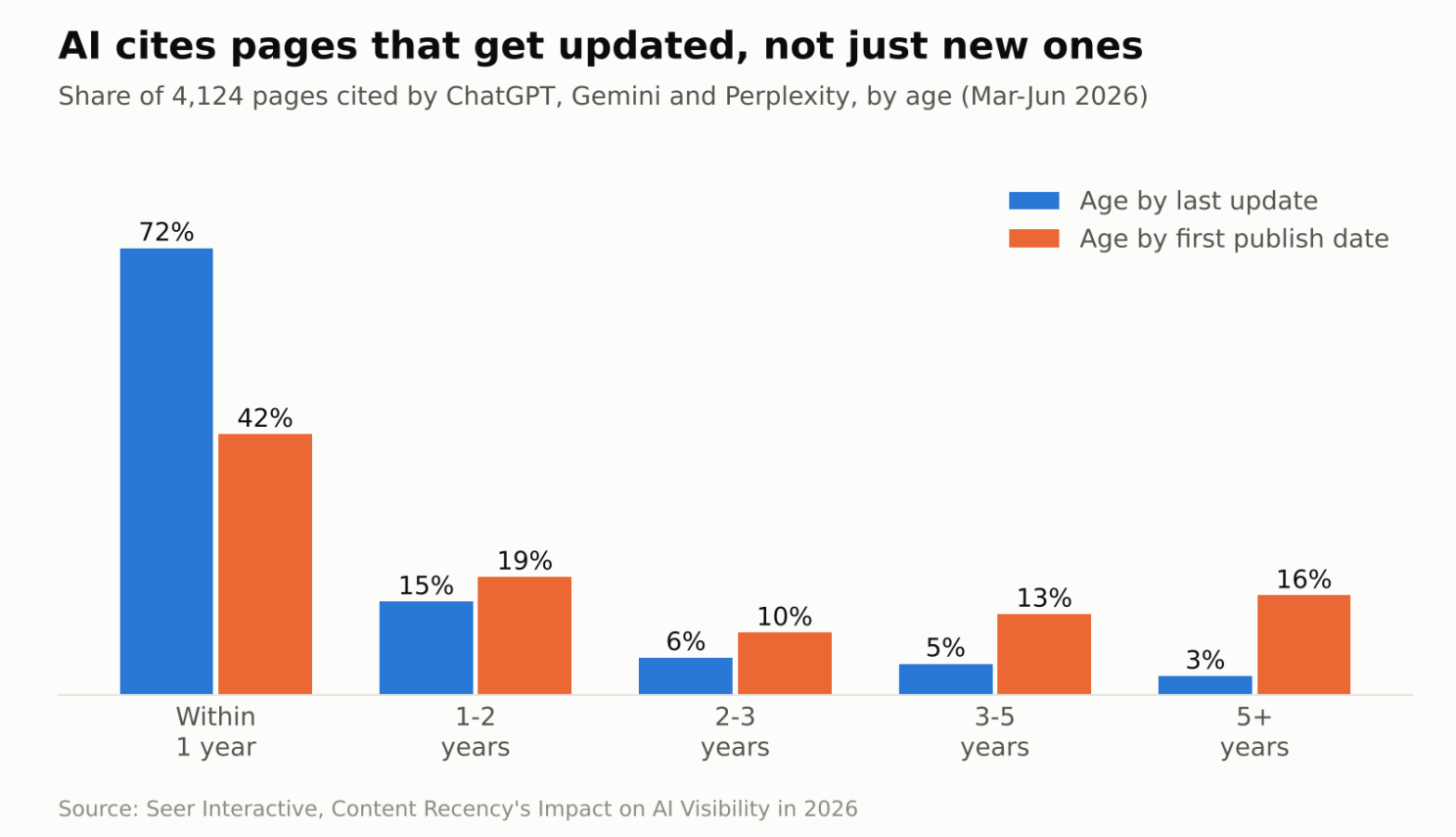
Read that again. A post published four years ago can still look “fresh” to an AI engine if you keep maintaining it. That’s good news for anyone sitting on a big archive.
One honest caveat: this is a correlation from one study, not proof that updating causes citations. And changing the date on a page without changing anything else won’t fool anyone.
My simple v1.1 routine
Here’s what I actually do, and you can follow it:
- Pick posts that already have traction. A post on page 2, or low on page 1, is the best candidate. It’s close.
- Re-read it as the searcher. What are they trying to do? Does the post answer that on the first screen?
- Fix what’s stale. Screenshots, features, pricing, stats, and broken links.
- Add something genuinely new. A better example, a clearer step, or a missing section. Not filler.
- Re-publish and watch it for a few weeks. Treat it like a release and check the numbers afterward.
The mindset shift
Stop asking, “What should I publish next?”
Start asking, “Which post I already published is closest to winning, and what would make it the best answer on the internet?”
Your best new post this quarter might already be live. It just needs a v1.1.
Your turn: what’s one old post of yours that deserves an update this week? Let me know in the comments. I’m curious how many of us are sitting on a quiet winner.
— Abid Hasan Shishir